If you train three days a week when work allows and two when it doesn't, your program needs a different shape from one that counts down twelve weeks to a date when you want to peak.
In LogBeetle that shape is the program type. There are three of them, flexible, linear and cyclic, and you pick one under Program type on the program page. The type decides how the builder lays out your workouts and which session the dashboard offers you on training day. For a map of the whole app, start with How LogBeetle fits together.
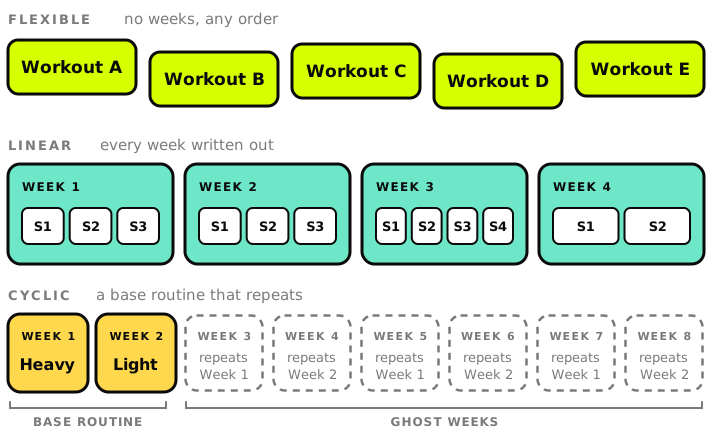
Flexible has no calendar #
A flexible program is a list of workouts with no weeks and no fixed order. You open the one that suits the day and play it. The dashboard suggests the first workout you haven't logged yet, and you can ignore the suggestion and pick another.
This fits training around a schedule that moves, or a set of conditioning sessions you rotate through. Flexible is the type on the free plan, and eight of the ten predefined programs in the app are flexible.
Linear changes from week to week #
A linear program is laid out week by week, and you write each week yourself. Every week holds its own sessions, numbered S1, S2 and S3 in the order you do them, and a program can run up to 52 weeks.
On training day the dashboard offers the next session of your current week that you haven't logged. Once you've logged every session in that week, it moves you on to the next one.
Use linear when the weeks differ from each other, like a plan that gets harder each week. Linear Barbell Progression, one of the predefined programs, is a twelve-week linear plan you can import and read before you build your own.
Cyclic repeats one routine #
A cyclic program has a base routine of one or more weeks and a total duration. The base routine repeats until the duration runs out, so the total has to be a multiple of the base length. A two-week heavy and light cycle can run for 8 weeks, and a four-week wave can run for 16.
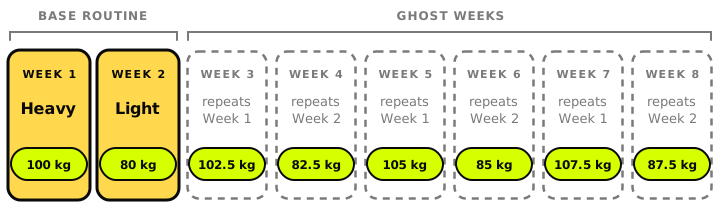
The weeks after the base routine are ghost weeks. They show up dimmed in the builder with a label like "repeats Week 1", and you can't add a workout to one, because a ghost week isn't stored anywhere. To change week 7 of a two-week cycle, you edit week 1.
What changes from one cycle to the next is the numbers. A formula can read the current week, so a squat set gets heavier each cycle without anyone editing the base routine. Without formulas, a cyclic program is the same week on repeat with the same numbers.
Base values and your records #
Linear and cyclic programs can hold base values, named numbers such as a squat training max or a starting weight. The person who writes the program sets some of them. The others are asked for when you start the program, so the same program works for someone who squats 80 kg and someone who squats 180.
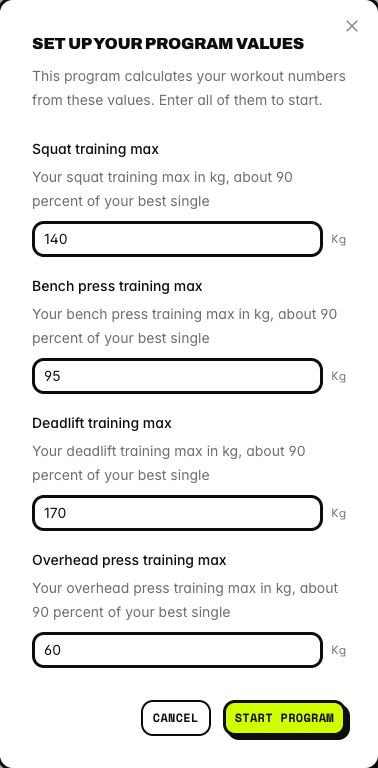
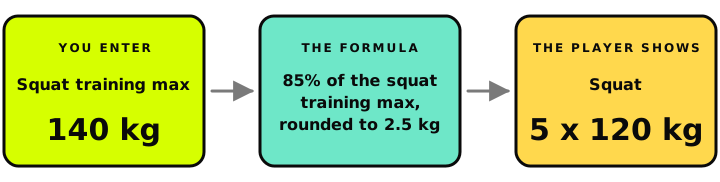
Any field in a workout, such as the weight of a set, can use a formula instead of a fixed number. The formula can read the base values, the current week and your personal records, like your squat 1RM or your 5k best. A set can be 85% of your squat training max, rounded to 2.5 kg, and the player shows you the number already worked out. Training Max Strength Cycle, a predefined program, works this way. Its base routine is three working weeks and a deload, it runs for 16 weeks, and its weights come from training maxes the app asks for when you start.
Formulas also work in a flexible program, but there they can read only your records, because a flexible program has no weeks and no base values. A later post in this series covers formulas in detail.
Picking one, and changing your mind #
| Type | Weeks | Use it when | Plan |
|---|---|---|---|
| Flexible | None | You pick the session on the day | Free |
| Linear | Each one written by you | The plan changes from week to week | Paid |
| Cyclic | A base routine that repeats | The same weeks repeat and formulas change the numbers | Paid |
The deciding question is whether your weeks differ. If they do, pick linear. If they repeat and only the numbers change, pick cyclic, and if you don't train to a calendar at all, pick flexible.
Changing the type later keeps your workouts. A linear program switched to flexible hides its weeks without deleting them, so switching back to linear restores the layout. A cyclic program switched to linear keeps its base weeks as real weeks and drops the ghost weeks, which held nothing of their own.
The rest works the same for all three. You can start several programs and switch between them from the dashboard, and each one keeps its current week while it waits. A program you finish moves to Archived programs on its own, and Unarchive brings it back where you left off.
Linear and cyclic programs need a paid plan, and so do formulas and base values. Following a linear or cyclic program that someone else assigned to you is free. The pricing page lists what each plan includes.